Como criar a imagem de uma casa e animar sua construção com IA
16/08/2026
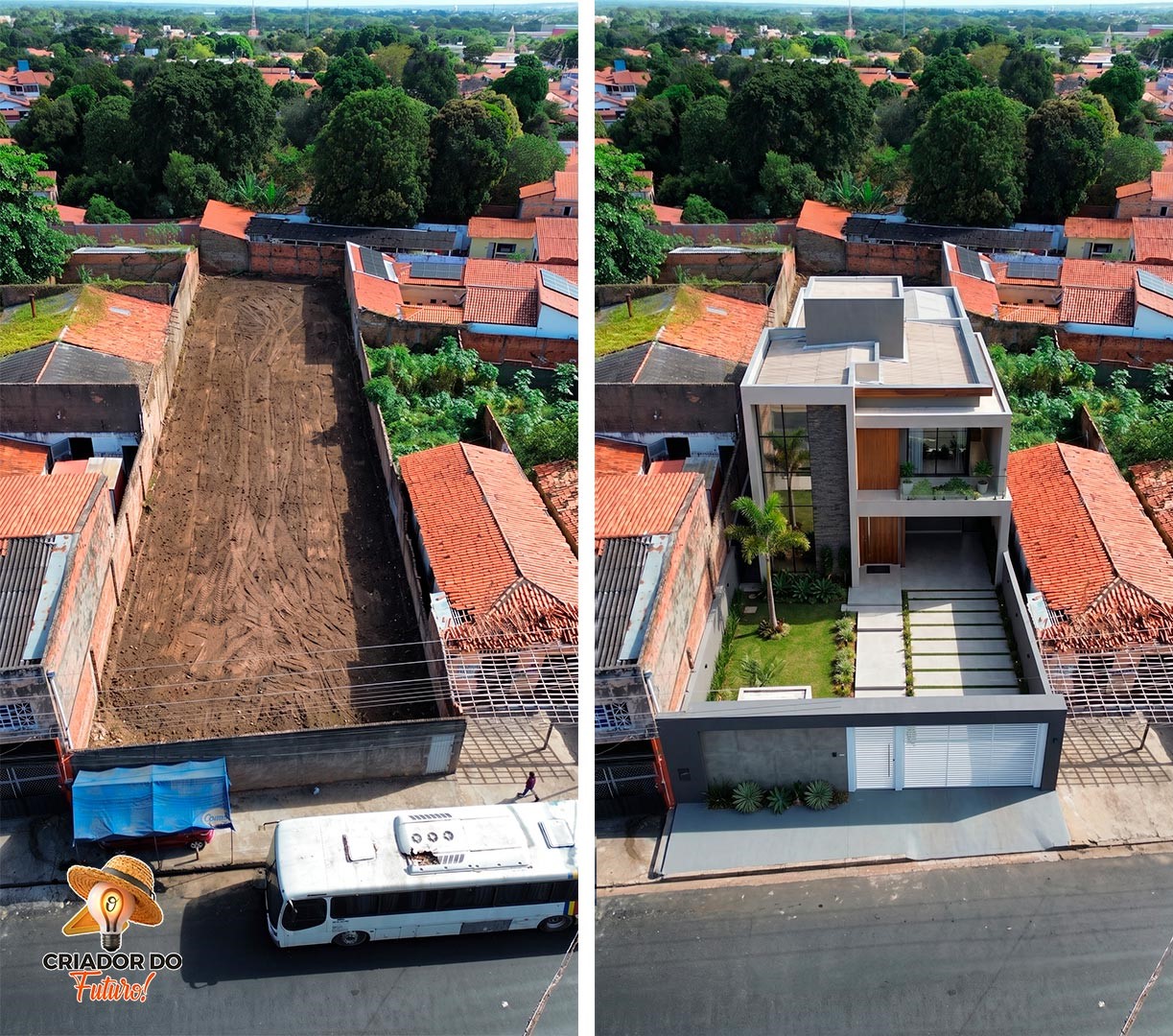
Fala Criadores, chegamos à Parte 3 e última da nossa série. Agora eu vou ensinar uma das etapas mais legais: como transformar aquele terreno que já está limpo em uma imagem com a casa pronta e, depois, criar uma animação mostrando a construção acontecendo. Tudo isso usando IA, tecnologia e alguns prompts, de uma forma fácil e prática.
Primeiro, vamos criar a imagem da casa. No Google Flow, escolha a opção Imagem, formato 9:16, modelo Nano Banana 2 e selecione x4 imagens para gerar quatro opções. Na primeira imagem enviada, você vai colocar o terreno limpo que criamos na Parte 2. Na segunda, pode enviar qualquer imagem de fachada de casa que você desejar. Pode ser uma casa moderna, térrea, de alto padrão ou outro estilo. Se você tiver um projeto próprio, melhor ainda: use a imagem do seu projeto como referência para a IA. Depois, basta copiar e colar o prompt abaixo e gerar as imagens.
Prompt da Etapa 1 – Criando a casa no terreno
{
"prompt_summary": "Insert a high-end house with 2 floors into the provided empty lot, featuring a , adapted to sunny climate conditions, with , captured from a , while strictly preserving the original land dimensions and perspective.",
"parameters": {
"role": "You are a professional real estate architectural visualization specialist focused on realistic property development previews.",
"objective": "Insert a realistic residential house into the existing empty lot to visualize future construction without altering the original terrain or environment structure.",
"reference_image_rule": "The uploaded land image is the absolute spatial and dimensional reference and must be strictly respected.",
"house": {
"type": "high-end house",
"floors": "2 floors",
"facade": "",
"architecture_logic": "proportional to the lot size, realistic construction scale, structurally feasible design"
},
"environment_adaptation": {
"climate": "sunny climate",
"materials_adjustment": "facade materials and roofing appropriate for the selected climate",
"natural_light_behavior": "consistent with the original image lighting direction"
},
"landscaping": {
"type": "",
"integration": "landscaping must respect existing terrain levels and boundaries",
"scale": "proportional to the lot dimensions"
},
"camera": {
"angle": "",
"lock_position": "Maintain the exact original camera position, framing, horizon line, and perspective depth",
"lens": "real estate architectural photography equivalent (24mm–35mm)",
"composition": "professional property development preview style"
},
"realism": {
"rendering": "ultra realistic architectural visualization",
"resolution": "high resolution",
"materials": "accurate textures, natural shadows, correct reflections",
"integration_quality": "seamless blending with ground, shadows aligned with existing light source"
},
"structural_land_integrity_lock": {
"priority": "absolute",
"rules": [
"Never alter the lot dimensions, width, depth, or total area.",
"Never modify the terrain slope, elevation, or natural ground level.",
"Never expand or shrink property boundaries.",
"Never remove or reposition existing trees, sidewalks, poles, walls, neighboring structures, or visible environmental elements.",
"Never change the original sky unless explicitly instructed.",
"Maintain exact perspective alignment with the uploaded image.",
"Ensure the house scale is realistic and physically plausible within the lot."
]
},
"constraints": [
"No unrealistic mansion scale beyond lot capacity",
"No floating structures",
"No perspective distortion",
"No exaggerated landscaping that hides lot size",
"Respect urban feasibility and realistic construction proportions"
]
},
"style_reference_module": {
"reference_role": "The second uploaded image is a stylistic reference only.",
"interpretation_rule": "Use the second image exclusively to understand aesthetic direction, architectural language, material palette, and design atmosphere.",
"non_copy_rule": [
"Do NOT replicate the composition, structure, proportions, or layout of the reference image.",
"Do NOT duplicate architectural shapes or facade geometry exactly.",
"Do NOT recreate the same house model."
],
"creative_adaptation_rule": "Recreate a new and original house design inspired by the style reference, while strictly following all parameters defined in this prompt (house type, number of floors, facade style, climate adaptation, lot size, and camera angle).",
"style_alignment": {
"follow_style_aspect": "Quero a fachada da imagem referência (segunda imagem envia)",
"integration_logic": "Blend the stylistic inspiration naturally into the new architectural design without compromising lot realism or structural constraints."
},
"consistency_requirements": [
"Maintain architectural coherence.",
"Ensure materials and forms are consistent with the selected facade style.",
"Keep scale realistic for the provided lot.",
"Preserve environmental integration."
]
}
}
Depois que a IA gerar as quatro opções, escolha a que ficou melhor. Agora vamos para a parte mais interessante: animar a construção da casa. No Google Flow, selecione Vídeo e depois Elementos. Escolha o formato 9:16, o modelo Omni Flash, defina a duração entre 4 e 10 segundos, de acordo com o resultado que você deseja, e deixe a quantidade em x1. Na sequência, envie primeiro o terreno limpo e, como segunda imagem, a imagem da casa pronta que acabamos de criar. Agora é só copiar e colar o segundo prompt.
Prompt da Etapa 2 – Criando a animação da construção
{
"prompt_summary": "Construction timelapse from the first uploaded image (empty lot) to the second uploaded image (finished house on the lot). The house is built progressively from foundation to completion. Camera locked throughout.",
"parameters": {
"role": "You are a cinematic construction timelapse director. First uploaded image (before) is the empty lot. Second uploaded image (after) is the finished house.",
"source_images": {
"first_image": "Empty lot. Starting state. Camera angle locked permanently to this frame.",
"second_image": "Finished house on the lot. Ending state. Final frame must be identical to this image."
},
"camera": {
"instruction": "Locked to the exact angle and perspective of first uploaded image (before). Never moves, rotates, tilts, or zooms at any point."
},
"construction": {
"instruction": "Animate realistic construction progression from empty lot to the finished house in second uploaded image (after). Foundation poured, structural walls rising, roof assembled, facade cladding, windows installed, landscaping planted. Each phase advances in physically logical order."
},
"lighting": {
"transitions": "Natural time-of-day cycling — early morning through midday, afternoon, and warm sunset as construction advances.",
"final_reveal": "Interior lights gradually turn on and exterior lighting activates as the house completes."
}
},
"timelapse": {
"style": "Ultra-realistic cinematic construction timelapse. Accelerated day and night cycles. Natural shadows shifting. Physically accurate materials.",
"speed": {
"current_value": "2x",
"options": {
"0.5x": "Very slow and detailed.",
"1x": "Balanced cinematic speed.",
"1.5x": "Slightly accelerated.",
"2x": "Fast and energetic.",
"3x": "Very fast — maximum impact."
}
}
},
"audio": {
"background_music": {
"enabled": false,
"style": "Cinematic and epic — builds progressively with construction, resolves triumphantly at final reveal.",
"fade": "Fade in at start. Fade out at end."
},
"sound_effects": {
"enabled": false,
"rules": [
"Active construction sounds throughout — machinery, workers, materials — accelerated to match timelapse speed.",
"Final reveal: construction sounds fade into calm natural ambient atmosphere."
]
}
},
"hard_negatives": [
"NEVER move the camera.",
"NEVER alter the lot dimensions, terrain, or surrounding environment.",
"NEVER build anything other than the house in second uploaded image (after).",
"NEVER end the video on anything other than second uploaded image (after)."
],
"realism": {
"render_quality": "Ultra-realistic, photorealistic, 4K cinematic, natural color grading."
}
}
E pronto! Com essa técnica, eu consigo mostrar todo o processo de transformação do terreno: primeiro a limpeza e terraplanagem, depois a casa inserida no terreno e, finalmente, a animação da construção. É uma forma fácil e criativa de usar a IA para apresentar projetos de arquitetura, imóveis e futuros empreendimentos de maneira muito mais visual. Quer ver como ficou o resultado? Confira a animação no Instagram @zefilho_imagens.
Clique aqui: https://www.instagram.com/zefilho_imagens.
Quer descobrir mais ferramentas, prompts e tendências do universo da IA? Acesse www.ocriadordofuturo.com.br e fique por dentro das novidades que estão transformando a criatividade digital.